Chinese Boost Browser Extension
Look up Chinese words on any web page. Hover a word for its pinyin and meaning, or select a passage to see every word in it, and save words to your Chinese Boost list as you read.
- Firefox The beta is on its way
- Chrome Coming to the Chrome Web Store
Hover a word
Point at a Chinese word and the extension shows its characters, its pinyin in tone colours, its HSK level and its meanings, with a link to its entry in the Chinese Boost dictionary. It finds where the word starts and ends, so pointing at 热 in 热情 gives you 热情.

Look up a whole passage
Select some Chinese text, right-click it and choose Look up with Chinese Boost. A panel opens beside the page with every word in the selection, in order, each with its pinyin, meanings and level.

Choose the websites you read on
Hovering works on the websites you add, and nowhere else. Open the extension
from the toolbar on any page to add that website, and your browser asks you to
allow it. A website includes its subdomains, so adding reddit.com covers
www.reddit.com and old.reddit.com too.
On a website you would rather not add, the same button turns hovering on for the page in front of you until you leave it. Right-clicking a selection works on any page without adding anything.

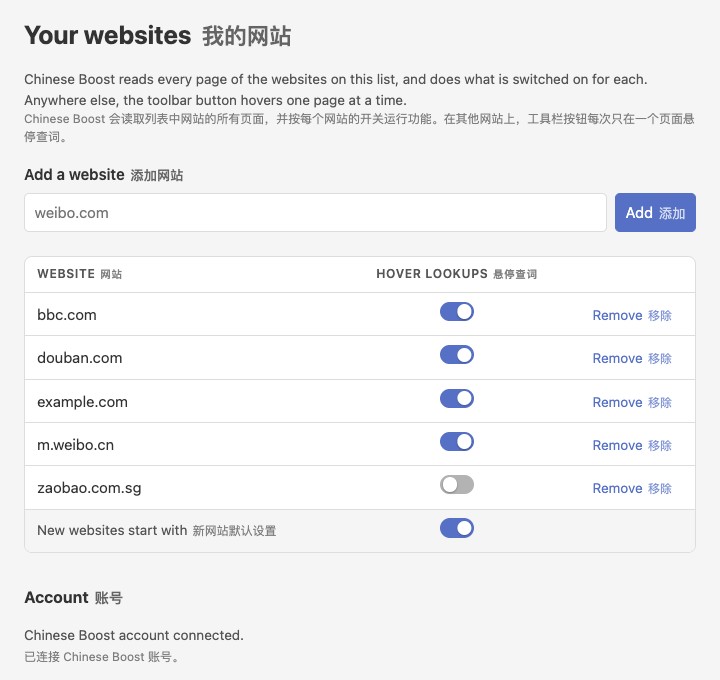
Your websites are listed in the extension’s settings, where you can switch hovering off for one or take it off the list.
Save words as you read
Connect your Chinese Boost account from the extension and every word it shows you gets a Save button. A saved word goes onto your list on Chinese Boost, tagged with the website you read it on, alongside every word you saved on the site.
English and Chinese
Everything the extension says is in English and in Chinese. The Chinese is in traditional characters if your browser asks for Chinese as written in Taiwan, Hong Kong or Macau, and in simplified characters otherwise.
Privacy
The extension reads pages in your browser. It sends Chinese Boost the words you look up, and when you save one it sends the name of the website you saved it from. The privacy page has the details.
The beta
The Firefox extension is a beta, installed from this page. Firefox asks you to confirm before it installs, and the extension updates itself when a new version is out. It needs Firefox 140 or later on a computer. Firefox for Android is not supported, since hovering needs a mouse.
The Chrome version is coming to the Chrome Web Store.
Powered by pinyinjs